Buying a Mechanical Keyboard Under $50: What Actually Matters
Sub-$50 mechanical keyboards are genuinely good now, but the category is full of quiet compromises that are hard to spot in a product photo. This guide breaks down where the money goes at this price, which features are worth prioritizing, and which ones you can safely ignore.
 admin
admin
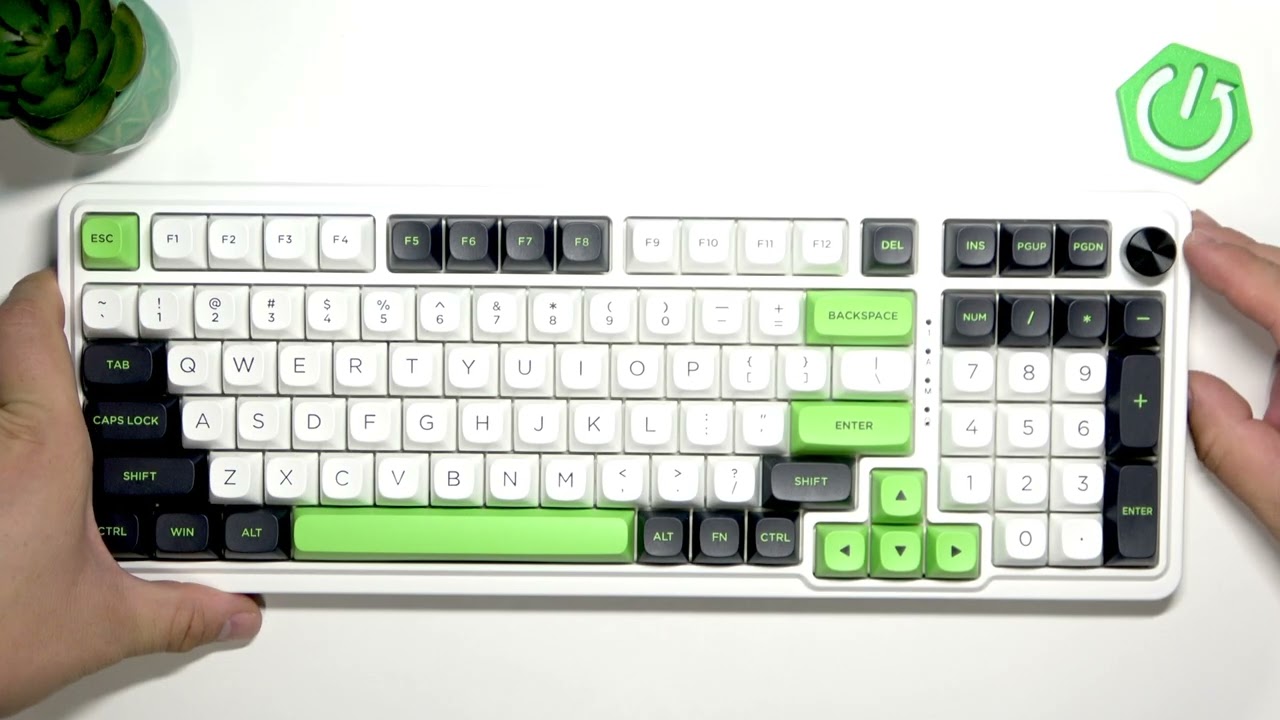
A mechanical keyboard used to be a hobbyist purchase. Today it is a normal one. Wireless mechanical boards now start below the $50 mark, and even entry-level models have picked up features that were premium not long ago ¹. That is good news for anyone who types all day or plays games at night, but it also makes the buying decision harder. At this price, every board is a set of trade-offs, and the marketing copy rarely tells you which ones you are making.
Start with why a mechanical board is worth the upgrade at all. A membrane keyboard registers a press through a rubber dome and a shared contact sheet, which is why cheap boards feel vague and wear out unevenly. A mechanical board puts an individual switch under every key, so each press actuates at a consistent point and the key tells your fingers when it has registered. Switches are typically rated for tens of millions of presses, which matters more than it sounds if you write for hours a day. The feel is the real selling point, though: consistent feedback reduces the small corrections and typos that come from mushy keys.
Where your money goes at $50
You cannot get everything at this price, so it helps to know what is actually expensive to manufacture. A metal case, thick PBT keycaps, gasket mounting, and sound-dampening foam all cost real money. A sub-$50 board usually ships with a plastic case, a tray-mounted plate, thinner keycaps, and stabilizers that may rattle out of the box. None of that makes it a bad keyboard. It means you should decide which of those things you care about most and accept compromise elsewhere.
The single most useful feature in this bracket is hot-swap sockets. A hot-swap board lets you pull switches out and push new ones in without soldering, which turns a $50 purchase into a platform you can tune later. If two boards otherwise look identical, the one with hot-swap sockets is usually the better buy, because switches are the part most likely to change your opinion of the keyboard.
Switch choice matters, but less than the internet suggests
Budget boards typically use licensed or clone versions of the classic linear, tactile, and clicky designs. Linear switches travel smoothly with no bump, tactile switches have a noticeable bump at the actuation point, and clicky switches add an audible click that will make you unpopular in shared rooms. Most people who type a lot gravitate toward tactile or heavier linear switches; most people who game a lot tend to prefer light linears.
Here is the part buyers underestimate: at this price, the case, plate, and keycaps shape the sound and feel of a board at least as much as the switch does. Two keyboards with the same switch can feel completely different. That is an argument for buying from a seller with a reasonable return policy rather than agonizing over switch charts.
Form factor and layout
Full-size boards include a number pad. Tenkeyless (TKL) drops it. 75% layouts compress the arrow and function clusters into a tighter block, and 65% and 60% layouts remove keys entirely and rely on layers to reach them. For a first budget board, 75% and TKL are the safest picks: they save desk space without forcing you to relearn where anything is. If you work with spreadsheets, think hard before giving up the number pad, even if it means a bigger footprint.
One spec worth checking carefully is the bottom row. Non-standard key sizes make it harder and more expensive to replace keycaps later, which undercuts one of the main reasons to buy a mechanical board in the first place.
Wired versus wireless
Wired USB-C is the cheapest, most reliable option, and for a stationary desk setup it is usually the right one. Wireless boards in this bracket typically offer a 2.4GHz dongle, Bluetooth, or both, and the 2.4GHz connection is generally the better choice for gaming because it avoids Bluetooth's added latency. But keep in mind that adding a battery and a radio means the money came from somewhere else, whether that is the case, the keycaps, or the stabilizers. A great wired board will often beat a mediocre wireless one at the same price.
Software, remapping, and operating systems
Open-source firmware support is a luxury at this price, but basic remapping and onboard memory are increasingly common. Even a proprietary web configurator is better than nothing if it lets you fix an awkward key or set a couple of macros, because you cannot change the physical layout of a board you already bought.
Cross-platform buyers should check keycap legends before ordering. Some brands ship Mac-oriented legends by default while including Windows keycaps in the box, while others are Windows-first and do not always include Mac replacements ². The board will usually still work on either system; the question is whether the labels match what the keys do.
The gaming caveat
If competitive gaming is the main job, it is worth knowing that the higher end of the market has moved toward magnetic, Hall-effect switches with adjustable actuation and rapid trigger, and reviewers who test keyboards for a living now often reach for those over mechanical boards for that specific use ². Those features generally sit above the $50 line. For most players, a competent budget mechanical board is entirely fine, and the money saved is better spent elsewhere in the build, much like the reasoning behind choosing a value-oriented GPU such as the one covered in this [RX 6600M breakdown](https://nymasoft.com/2024-budget-king-graphics-card-rx-6600m).
A practical checklist
Before you buy, confirm hot-swap sockets, a standard bottom row, a detachable USB-C cable, and the layout you actually want. Prioritize PBT keycaps over ABS if you have the choice, look for a board with a return window long enough to test it properly, and treat RGB lighting as a nice extra rather than a reason to pay more. Skip anything with no clear seller or support path, no matter how good the spec sheet looks.
The honest summary is that $50 no longer buys a toy. It buys a keyboard with one or two corners cut, and the trick is choosing which corners you will not miss. Get the layout, the switch feel, and the hot-swap sockets right, and the rest can be upgraded later.