NostalTech: The Palm Pilot and the PDA That Learned to Stay Out of the Way
The Palm Pilot succeeded not by acting like a tiny PC, but by doing a few pocket-sized jobs consistently well. This retrospective looks at the Pilot 1000 and 5000, the Graffiti input compromise, Palm’s long shadow over mobile computing, and how browser emulation is keeping early PDA software alive.
 admin
admin
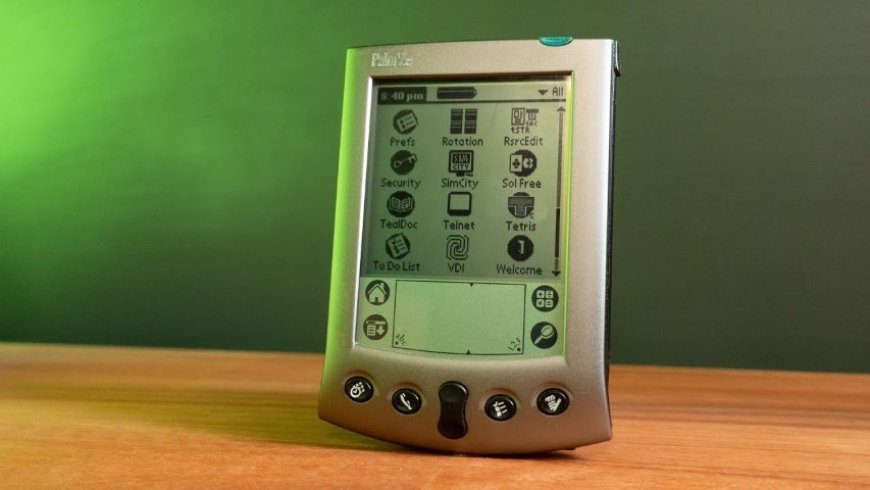
The modern smartphone is a camera, map, wallet, messaging terminal, music player and pocket-size window into the internet. Against that, an early PDA looks primitive. But the Palm Pilot’s real trick was not to imitate a desktop computer. It was to do a small number of useful things reliably, and to be ready when the user needed them.
Palm Computing, then part of U.S. Robotics, shipped the Pilot 1000 and Pilot 5000 in March 1996. The Pilot 1000 had 129 KB of memory and cost $299, while the 5000 offered 512 KB. Those figures sound almost comically small now, but calendar entries, contacts, memos and to-do lists do not need much space. In the same period, Apple’s Newton MessagePad had attracted plenty of media attention but little commercial success at around $700 ¹. The lesson was not that Palm built a more powerful machine. It built a more focused one.
That focus showed most clearly in Graffiti. Instead of trying to recognize ordinary handwriting, Palm asked users to learn a simplified set of single-stroke characters drawn with a stylus. It was a compromise, and it required practice. But it was predictable. On the modest hardware of the time, predictability mattered more than ambition. The device asked the user to meet it halfway, and in return it usually produced the right character. Less magic, more dependability.
The rest of the design followed the same logic. A PDA was not meant to replace the desktop PC; it was meant to cover the gaps around it. Checking the next appointment while standing in a hallway, jotting a note before it disappeared, carrying a contacts list without a paper address book: these were small tasks, but they were frequent. Desktop synchronization turned the handheld into a companion rather than a second computer. The Palm’s value came from being available in the moments when a PC was not.
Palm did not invent the PDA category. Apple’s Newton, Psion organizers and other early handhelds had already explored it. But Palm made the category feel practical and affordable enough for ordinary users. The Palm name became shorthand for PDAs, and the handheld form factor remained a leading model for nearly a decade before the smartphone absorbed it ². That is the important legacy: not a particular screen size or stylus slot, but the idea that a pocket computer should be immediately useful rather than merely impressive.
The software ecosystem grew around that idea. Palm OS applications covered productivity, reference, games and niche tools. Today, the Internet Archive has made hundreds of Palm OS applications available through browser-based emulation ². That preservation effort matters because original hardware is awkward to revisit. Old batteries, lost styluses and obsolete sync cables turn nostalgia into a repair project. Emulation offers a lower-friction way to remember what the software felt like. For collectors, condition is everything: a working stylus, a readable screen and a usable synchronization setup matter more than a cosmetic scratch.
The PDA did not vanish so much as get absorbed. As phone screens grew, batteries improved and mobile networks became faster, the calendar, contacts, notes, camera and music player converged into one device. The modern smartphone is not a direct descendant of any single PDA, but it inherited the central promise: carry the information and tools you need, and make them available in seconds. Palm later tried to reinvent itself with webOS and phones such as the Pre and Pixi, but the market had already moved toward ecosystems built around iOS and Android.
The Palm Pilot is easy to sentimentalize. It had a monochrome screen, a stylus and a learning curve. Yet its discipline is still worth studying. It did not try to be everything. It chose a few jobs, made them fast, and accepted trade-offs to get there. Modern devices rarely have that luxury, but the lesson survives in every app that opens quickly, every note that saves without fuss and every calendar that appears when you need it. For another NostalTech look at how the pocket computer evolved, see [NostalTech: iPhone 6](https://nymasoft.com/nostaltech-iphone-6).
Sources
- ¹ Von PalmPilot bis Palm Pre: Die Evolution der Palm-Geräte - Von PalmPilot bis Palm Pre: Die Evolution der Palm-Geräte www.computerwoche.de
- ² Palm articles www.techspot.com